WUGrid
Early development · v0.12.0 · read-only unless you restart

Watch every server through a Windows Update restart round

WUGrid shows each server's state every few seconds, restarts the ones you pick without forcing them, and checks what a green restart can hide. It works agentless over WMI/DCOM, so it runs where WinRM is closed and installs nothing on the servers.

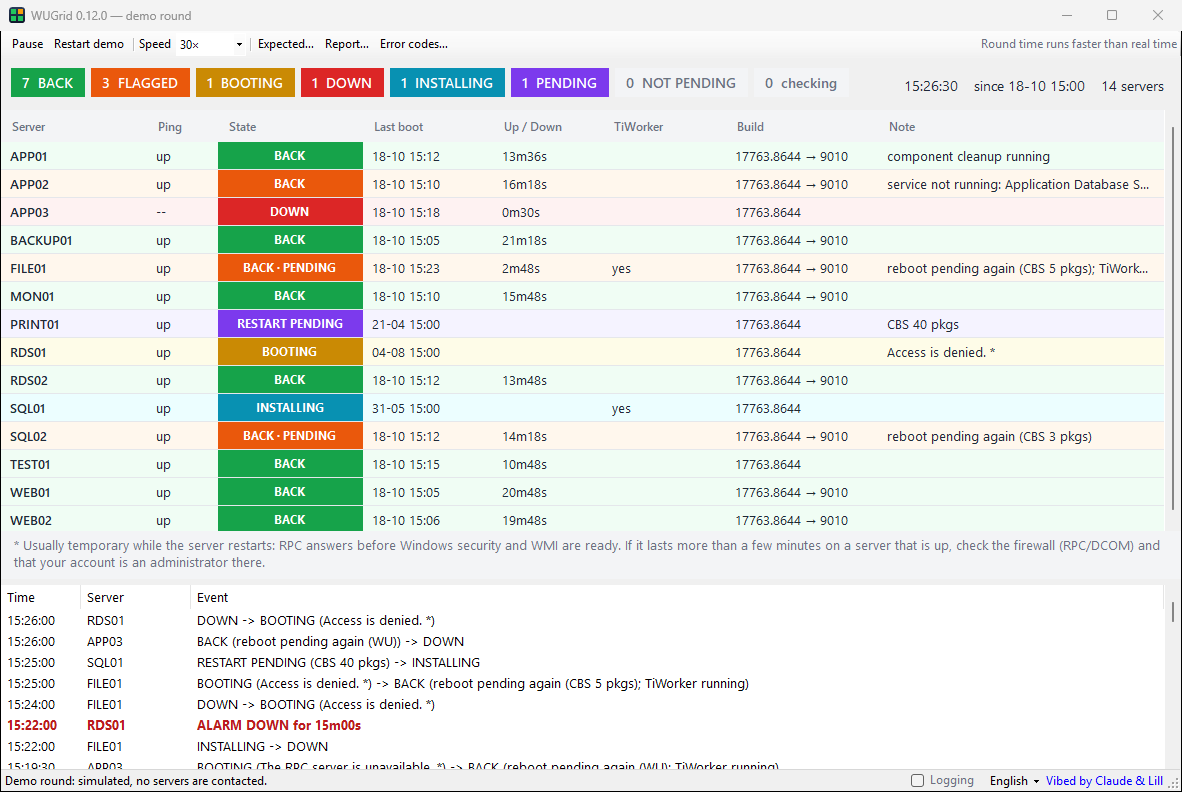
The WUGrid window during a demo round: fourteen servers, coloured by state (back, flagged, booting, down, installing, restart pending), counts across the top, and the round's events below.

The demo round, 26 minutes in. Simulated servers; nothing is contacted.

Agentless

ICMP and WMI over DCOM, with one reused connection per server. It uses only what every Windows Server has: no WinRM, no agent and no ConfigMgr.

Observe by default

Watching and verifying never change a server. A restart is a named action: you see the plan, confirm it, each server is checked again, and the result is recorded.

Rules from a real round

Built on a 54-server round. Chained reboots, a minute of “access denied” while a server boots, and component cleanup are routine and shown as such. Real failures are flagged.

Watch

Every server, at a glance

Each server gets its own worker that pings it and reads its last boot, servicing processes and the CBS and Windows Update reboot keys. A cut-off time decides what counts as restarted.

RESTART PENDING
not restarted yet; CBS packages or Windows Update waiting
NO RESTART PENDING
not restarted yet; nothing pending
INSTALLING
servicing before the shutdown
DOWN
no ping, with how long it has been down
BOOTING
answers ping, WMI not ready yet
BACK
restarted after the cut-off, checks clean
BACK · PENDING
restarted, but a restart is pending again
BACK
restarted, but an update failed or a service is not running

There are alarms for a server down 15 minutes or still pending 20 minutes after its boot, and one line when every server is back clean with its checks done.
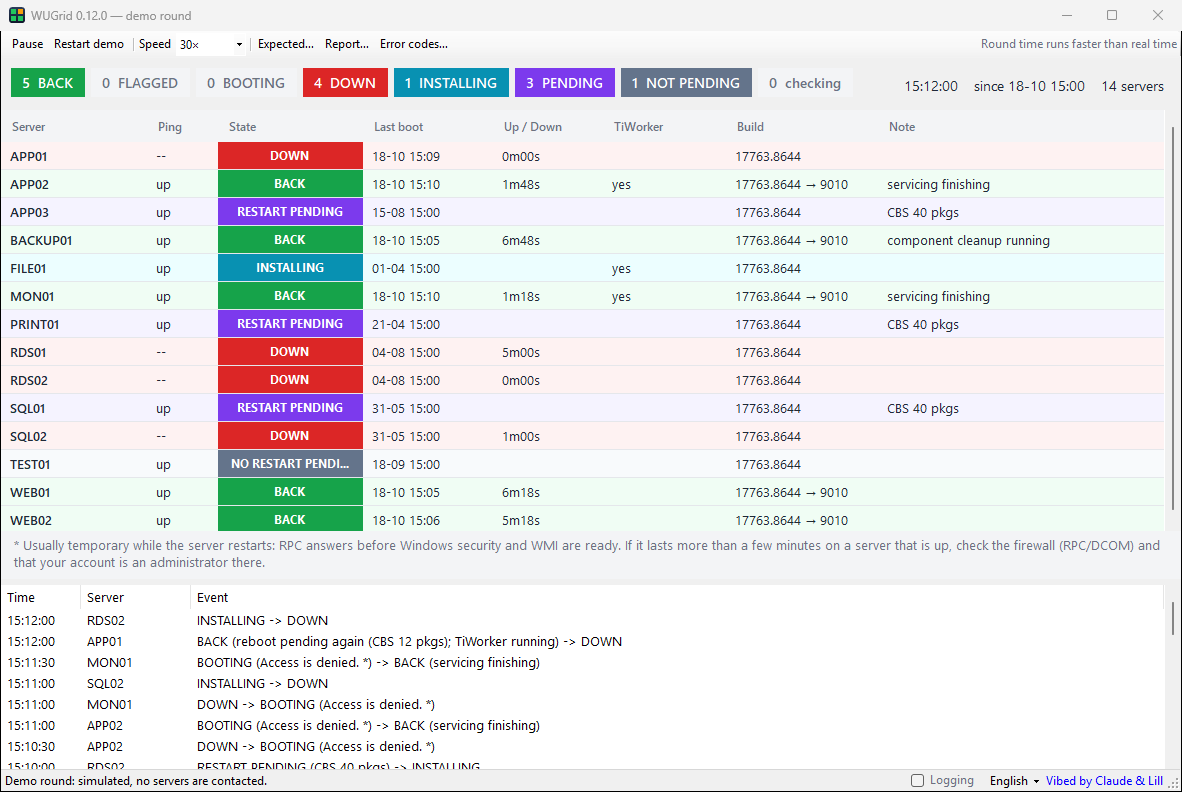
The grid 12 minutes into the demo round: servers installing, down, booting, back, with a restart pending or none pending.
12 minutes in: half the round still installing, down or booting.
Verify

Catches the restarts that only look green

When several months of cumulative updates were staged on top of each other, only the oldest committed. The servers came back looking clean, but at an old patch level. Once a server is back, WUGrid reads its System log and services (read-only) and flags:

  • an update that failed (Windows Update event 20), with the error explained;
  • a service not running that ran before the restart, who changed its start type, and why it did not start — timed out at start, a service it depends on, its account — and whether it failed at the boots before too; a stop you know about (a role being removed) can be marked expected: shown with the reason, not flagged;
  • who restarted it and why (event 1074), each boot and the build it came up on.

Double-click a row for the details. The Build column shows the build before and after.

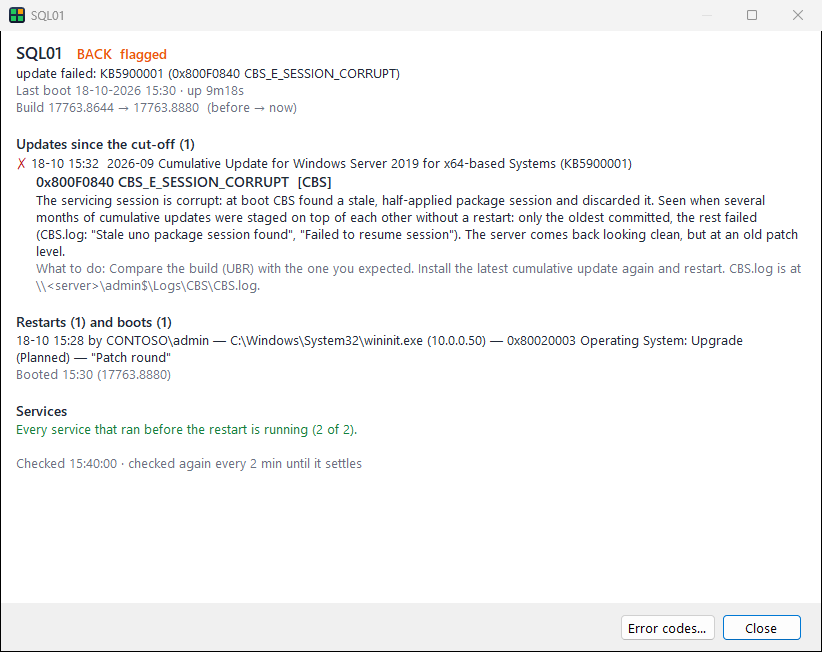
Details of SQL01: back but flagged, the 2026-09 cumulative update failed with 0x800F0840 CBS_E_SESSION_CORRUPT, the error explained with what to do, the restart by an admin, one boot, services all running.
Restart

Restarts that never force

  • Only servers with no update work running can be ticked, and each is checked again just before the restart is sent.
  • Never forced (Win32ShutdownTracker, reboot without force): running programs can delay or cancel it.
  • A server with a user signed in is skipped, naming who: Windows refuses a restart that is not forced while anyone is signed in.
  • An optional warning period, during which shutdown /a on the server aborts it.
  • Check only runs everything but the restart call.
  • Each request and result goes to an append-only audit log, and your comment shows up in event 1074 on the server.
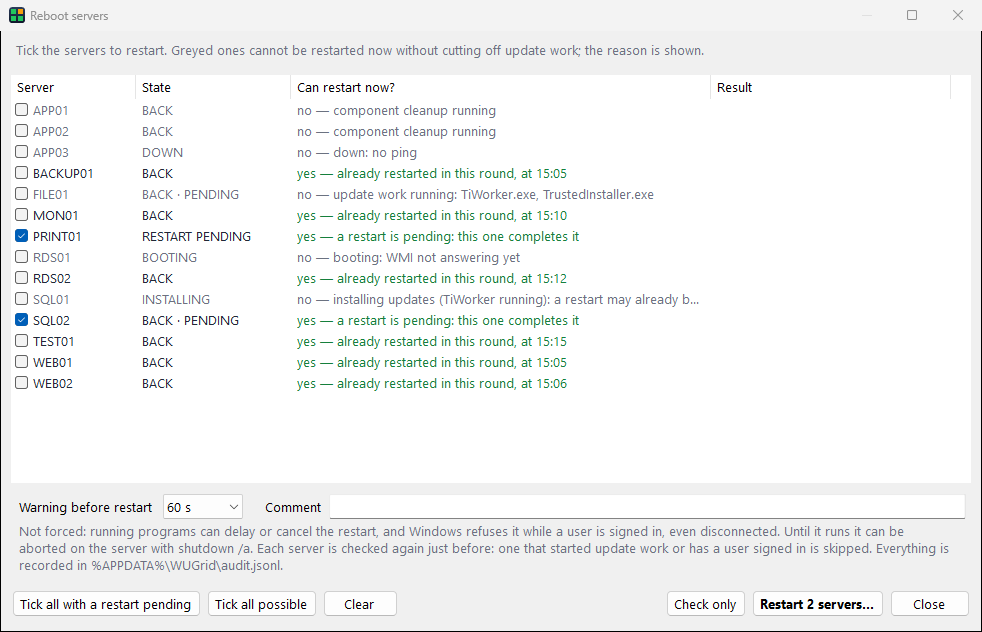
The Reboot servers window: each server with whether it can be restarted now and why not (component cleanup, down, booting, installing updates), two servers with a restart pending ticked, warning and comment options, Check only and Restart buttons.
Report

The round, on one page

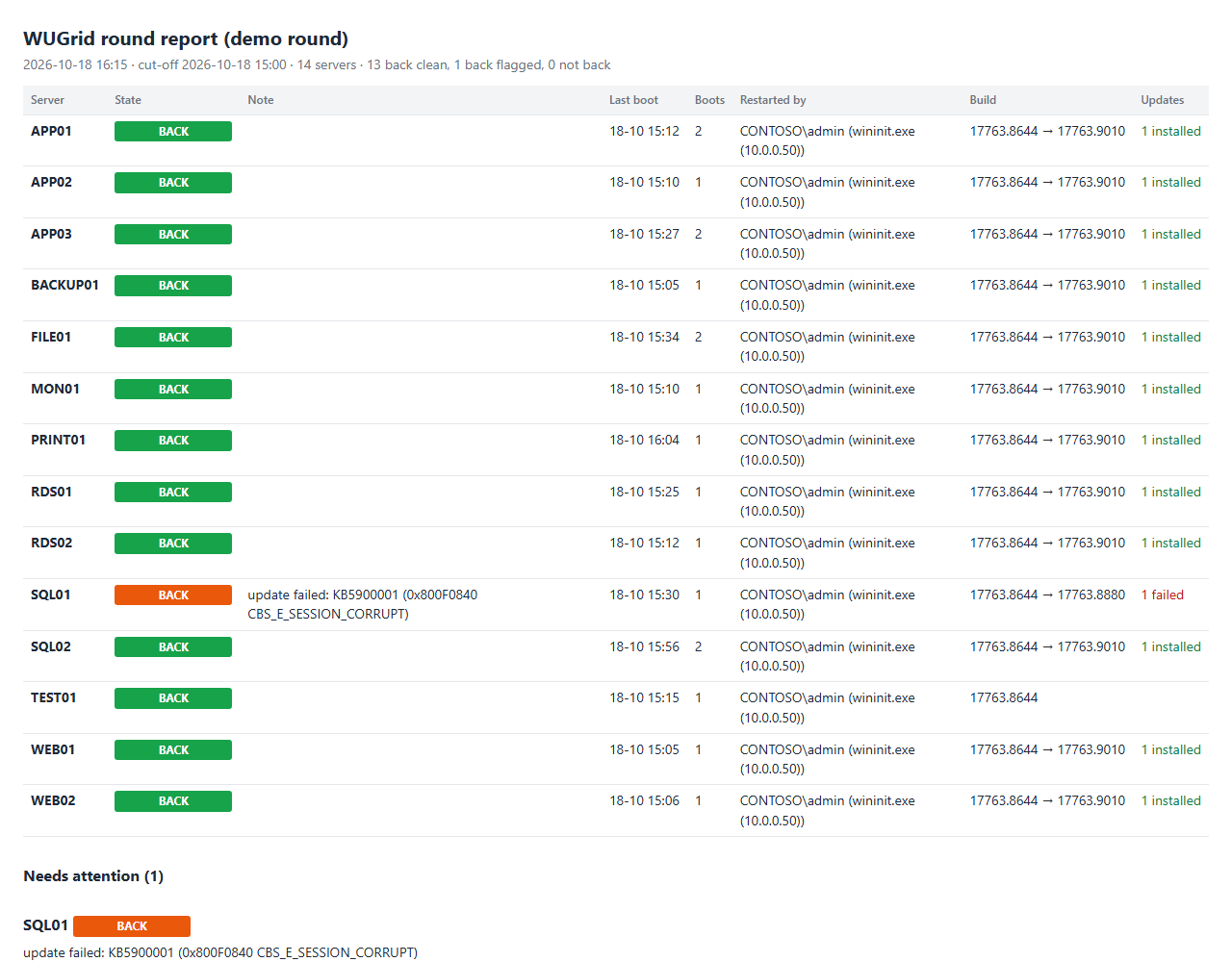
Report… saves the round as a self-contained HTML page, with a summary and a “needs attention” section to mail or attach to a change. It can also save CSV for Excel. wugrid-cli verify makes the same report from the command line.

Open the demo round's report →

The HTML round report: fourteen servers with state, last boot, boots, who restarted them, build before and after and updates installed, and a needs-attention section listing SQL01's failed update.
Explain

Every error code, explained

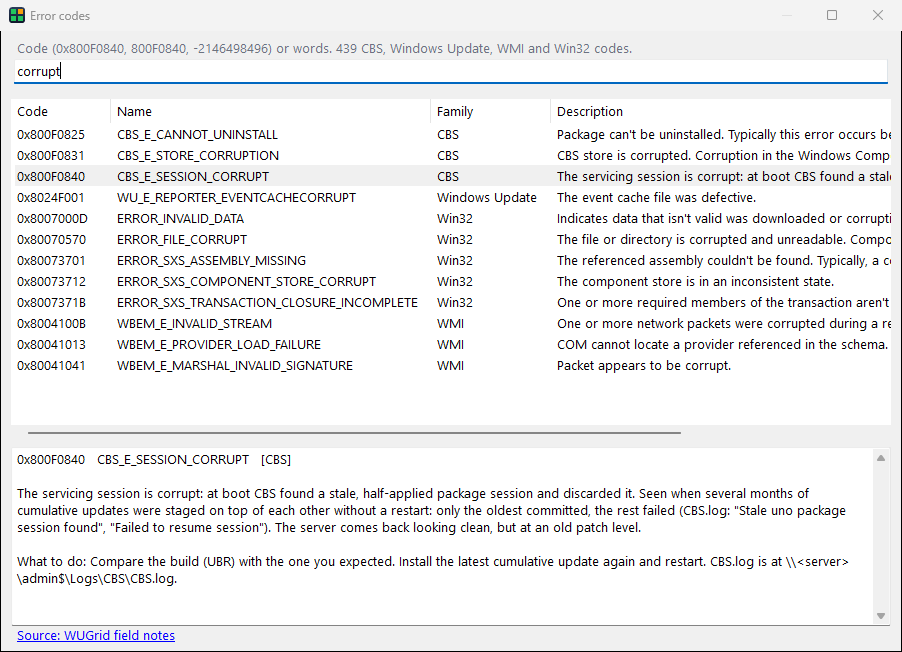
The catalog has 438 CBS, Windows Update, WMI and Win32 codes, with descriptions and fixes from Microsoft Learn and WUGrid's own notes for the codes it runs into on real rounds. Search by code or by word. Hover a note in the grid for a summary.

Decisions use event IDs and error codes, never message text, so they work whatever language the servers use.

The Error codes window searching for the word corrupt: CBS, Windows Update, Win32 and WMI codes, with 0x800F0840 selected and explained.
Console

The same round in a console

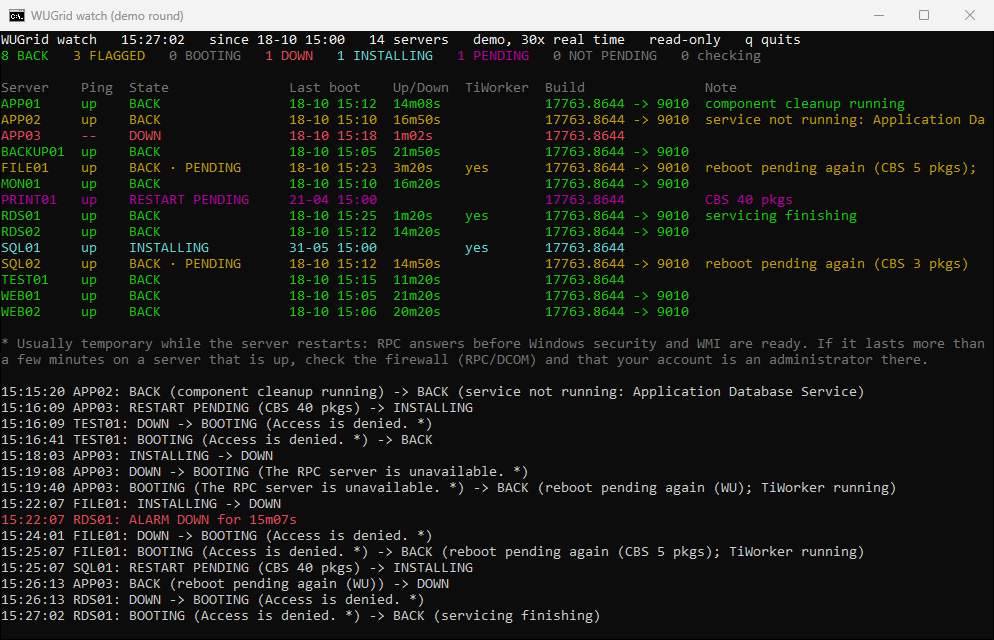
wugrid-cli watch uses the same probe, states, alarms and checks as the window. Its grid redraws every second; when the servers don't all fit, clean ones fold into a single line. It re-reads the server list file when it changes.

Run it headless and it prints one line per change and alarm, then stops once every server is back clean. A script or a background task can follow that output.

wugrid-cli watch in a console window: the same fourteen servers in coloured rows with counts, the transient-error footnote and the latest events.

Commands

> wugrid-cli watch --list servers.txt --since 2026-10-17T15:00
> wugrid-cli watch --list servers.txt --headless \
      --state state.json --events events.jsonl
> wugrid-cli verify SRV01 SRV02 --html round.html
> wugrid-cli check SRV01         # DNS, ping, WMI, admin$
> wugrid-cli error 0x800F0840   # explain a code

--state rewrites the round as JSON on every refresh and --events appends one JSON line per event. The exit code says whether every server ended back clean.

Headless output

15:22:12 RDS01: ALARM DOWN for 15m12s
15:29:07 SQL01: INSTALLING -> DOWN
15:31:09 SQL01: DOWN -> BOOTING (Access is denied. *)
15:31:40 SQL01: BOOTING (Access is denied. *) -> BACK
         (servicing finishing)
15:32:26 SQL02: ALARM back 20m14s, reboot pending again
         (CBS 3 pkgs)
15:32:57 SQL01: BACK (servicing finishing) -> BACK (update
         failed: KB5900001 (0x800F0840 CBS_E_SESSION_CORRUPT))

Taken from the demo round. The asterisk marks errors that are usually temporary while a server restarts.

Get started

WUGrid is in early development: download the latest release, or build it from source in a minute.

Download

A zip with WUGrid.exe and wugrid-cli.exe: unzip it anywhere and run, nothing to install. The binaries are not signed yet, so unblock the zip first (Properties → Unblock).

Latest release

Or build it, with the .NET SDK 8 or later:

> git clone https://github.com/Lill82/WUGrid
> dotnet build WUGrid.sln -c Release

Try the demo

A simulated 75-minute round of 14 made-up servers, with every pattern from the field notes. No server is contacted.

> WUGrid.exe --demo --lang en
> wugrid-cli watch --demo

The windows are in Catalan, Spanish or English: pick one in the status bar, or pass --lang. The console, the reports and the logs are in English.

Requirements

  • Windows with .NET Framework 4.8 on the admin workstation
  • ICMP and DCOM/RPC to the servers (SMB for the admin$ check)
  • An account that is an administrator on them
  • Nothing installed on the servers; WinRM not needed

Where it is going

From watching a round to driving it: scan, install, restart in waves, verify.

  1. M0doneFoundation: solution, tests, CI, anonymised field notes
  2. M1builtWatch: live grid, console grid, headless events, state JSON
  3. M2doneVerify: update results, services baseline and why a service did not start, who restarted, report
  4. M3first cutRestart: guards (update work, users signed in), re-check, never forced, audit, expected stops; waves and a protect list next
  5. M4nextUpdates: scan → approve → install → restart → verify, agentless
  6. M5first cutRelease: zip on GitHub Releases from 0.9.0; docs and code signing next

Who made it

WUGrid is written by Alex Lillo, a Windows sysadmin, with Claude. It started as a PowerShell watch grid built during a real 54-server patch round and grew into this tool. Questions, ideas and field reports are welcome on GitHub.